Cool Fonts Keyboard & Themes
- 4.6
- Rating
- 1.00M
- Installs
- Free
- Price

 Analysis by App-foxy
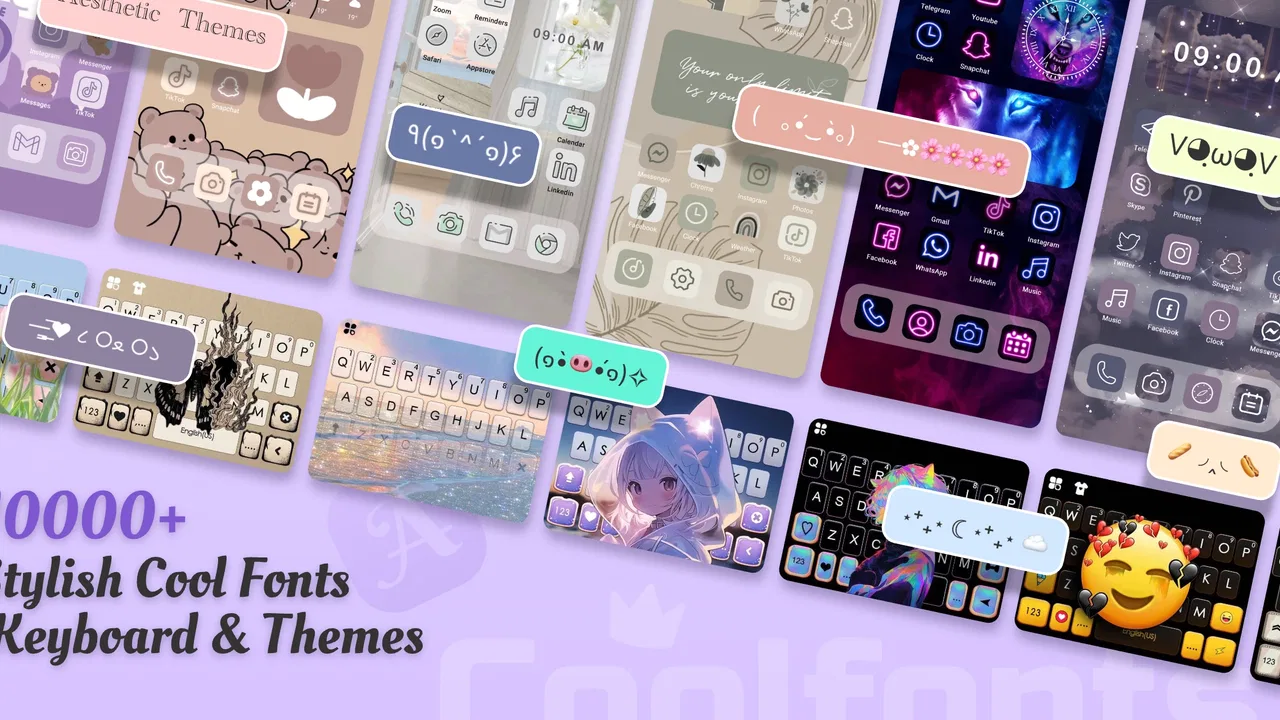
I spent time with Cool Fonts Keyboard & Themes as a personalization app, and my first impression was that it is aimed at people who want their phone to feel more expressive without building a complete theme from scratch. The focus is not just on changing one wallpaper. It brings together font styles, keyboard decoration, backgrounds, icons, widgets, and broader theme ideas in one place. That combination makes it more useful for experimenting with a phone’s look than a simple wallpaper changer, although it also means the experience can feel busier than a single-purpose customization tool.
Created by Art Maker Studio, the app is free to download and use as a starting point. It is rated for Everyone, works on devices running Android 6.0 or later, and its current version is 1.6.1. The app has reached over a million installs, with an average rating of 4.6 from around 5.3 thousand ratings and roughly 2 thousand written reviews. Those figures suggest that it has found a clear audience, but they do not remove the need to look closely at what the free experience actually offers and where optional purchases may affect the overall value.
How the free experience and optional purchases shape its value
I find the free starting point useful because it lets me explore the app’s different customization options before deciding whether any paid design is worth keeping. Since purchases are priced per item, I’d first settle on a look and identify exactly what feels missing; that makes it easier to judge whether an optional purchase adds enough value to justify its cost.
You May Also Like

 Blood Strike: 2.5 Anniversary
Blood Strike’s Loadouts Turn Every Drop Into a Tactical Gamble
A close look at Blood Strike’s custom loadouts: how fast access to signature weapons reshapes its battle royale rhythm, rewards preparation, and narrows the gap between fights.

 Pandora - Music & Podcasts
Pandora’s Music Is Easy to Start, but Harder to Recover
Pandora’s strength is its low-effort path from a seed to a station. Its weak spot is how much confidence it asks you to place in connection, setup, and quiet recovery.

 8 Ball Pool
 Is Built on Rivalries, Rematches, and Routine
A close look at the rivalries, rematches, shared routines, and unanswered safety questions that turn a quick pool match into a persistent mobile community.

 Samsung Music
’s Quiet Strength Is Playing What You Already Own
Its reach comes less from spectacle than from dependable access to a personal library. That simplicity is both the app’s strongest retention engine and its ceiling.

 AccuWeather: Weather Radar
AccuWeather Review: A Quick, Clear Forecast for Everyday Decisions
For everyday plans, the best forecast is the one you can understand quickly. AccuWeather makes rain timing, radar, and local conditions easy to act on, with a few trade-offs.

 Hill Climb Racing
Why Hill Climb Racing Still Turns Crashes Into One More Run
A tiny car, a bumpy hill and one more upgrade: Hill Climb Racing keeps resurfacing because its simple chaos makes every near-miss feel personal.
More From Our News Desk



A low-risk way to try several kinds of customization
The most important cost detail is straightforward: the app is free to install. That makes it easy to test without committing money before you know whether its style matches your taste. The optional in-app purchases range from $0.99 to $9.99 per item, so the value depends on whether the free selection is enough for you or whether you end up wanting paid designs. I would treat the free access as an opportunity to explore rather than assuming that every visual option is included at no cost.
That distinction matters because personalization apps can look generous at first while reserving the most distinctive designs for purchases. With this app, I would begin by checking how many fonts, keyboard appearances, backgrounds, icons, widgets, and themes are available without paying. If you only want a fresh keyboard style or a different font for occasional messages, free access may be all you need. If your goal is a coordinated home screen with a matching keyboard and icon treatment, the final cost can depend on which individual items appeal to you.
I also appreciate that the purchase structure is item-based rather than something I need to mentally convert into a long-term commitment. At the same time, individual purchases can become less attractive when you want several related elements. A single inexpensive design may feel reasonable, while collecting a font, keyboard look, wallpaper, and matching theme could add up. Since the listed price range covers separate items, I would decide on a complete visual plan before buying anything instead of purchasing designs impulsively one by one.
What the app delivers beyond a basic wallpaper switch
In practical use, the strongest part of Cool Fonts Keyboard & Themes is the way it connects several small changes. A wallpaper alone can make a phone feel different for a day, but a font style changes the mood of messages, a keyboard design is visible whenever I type, and icons or widgets affect the home screen every time I unlock the device. The app is therefore more interesting for someone who wants a consistent personal style than for someone who only wants a new background.
The keyboard is especially relevant because it is the part of the experience I would encounter most often. A decorative keyboard can make casual conversations, captions, and notes feel more personal. I would use a restrained font for everyday writing and keep more unusual styles for social posts or playful messages. That approach avoids one common problem with novelty fonts: they can be fun in short bursts but tiring when used for every sentence.
The background and wallpaper tools are useful when I want the keyboard and home screen to complement each other. A busy wallpaper behind a decorative keyboard can make the overall result feel cluttered, so I found it more effective to pair a stronger font or keyboard appearance with a simpler background. Conversely, a quiet keyboard works better when the wallpaper is the main visual feature. The app gives me enough categories to make those choices in one session instead of jumping between unrelated customization apps.
Icons and widgets add another layer, but they also require more patience. Changing a wallpaper is immediate; making a home screen look coherent takes decisions about color, spacing, and which elements deserve attention. My practical tip is to choose the wallpaper first, then select the keyboard and font, and only afterward consider icons and widgets. Starting with everything at once makes it harder to tell which change is actually improving the phone.
Three useful workflows that are easy to overlook
One useful workflow is to create a temporary theme for a specific period rather than trying to find one permanent style. For example, I could use a soft background, a readable font, and a subtle keyboard for workdays, then switch to something brighter for weekends. This makes the app feel less like a one-time decoration tool and more like a small personal style kit. The trade-off is that frequent switching may become more effort than it is worth if I prefer a stable setup.
A second workflow is to use the app selectively instead of applying every available customization. I can choose a new font and keyboard while leaving icons alone, or refresh the wallpaper and widgets without changing how text appears. This is valuable for people who want personality without sacrificing familiarity. It also helps identify which elements genuinely matter to me. In my case, the keyboard and background have a more noticeable daily effect than changing every icon.
A third insight is that readability should come before novelty. An elaborate font may look attractive in a preview but become inconvenient in longer messages, small labels, or fast typing. I would test a style by writing a normal paragraph, checking punctuation, and looking at it in both short and long words before settling on it. If a design makes me slow down or misread text, the visual appeal is not worth keeping. This is one area where a plain system option may be better than a decorative choice.
Where the experience can be less convenient
The broad selection is also the main source of friction. Combining fonts, keyboards, wallpapers, icons, widgets, and themes creates more decisions than a focused app would. Someone who only wants a simple background may find the additional categories distracting. I would not recommend installing it solely for one small adjustment unless I also expected to explore the other personalization options.
There is another trade-off between visual freedom and consistency. A font may look excellent with one keyboard design but awkward beside a particular wallpaper or widget style. Because each element has its own visual character, matching them takes trial and error. The app can provide ingredients for a polished result, but it does not replace personal judgment. The best outcome comes from limiting the palette and avoiding the temptation to use the most dramatic option in every category.
Optional purchases are another point to watch. The free entry point is helpful, but the presence of items priced up to $9.99 means I would inspect each purchase carefully before confirming it. A design can be attractive without being essential, and the difference between a free setup and a paid one may be smaller than expected if I already have a wallpaper or keyboard style I like. I see paid items as optional upgrades, not a requirement for trying the app.
People who need advanced control over typography, launcher behavior, or system-wide appearance may also find this app limited compared with specialized tools. Cool Fonts Keyboard & Themes is built around accessible visual changes, not deep technical customization. If I wanted precise control over every launcher detail, a dedicated launcher or system theme solution would probably suit me better. If I wanted to design original graphics from the ground up, a separate editing app would be the more appropriate choice.
Who is likely to get the most from it?
This app makes the most sense for casual Android users who enjoy refreshing their phone’s appearance and want several types of customization gathered together. It is a good fit for someone who likes expressive fonts in messages, enjoys changing backgrounds, and wants to experiment with keyboard or home-screen styling without searching through multiple unrelated apps. The Everyone age rating also makes its presentation approachable for a broad audience.
It is particularly useful for a realistic everyday situation: imagine noticing that your phone feels dull before a trip, a birthday, or a new school term. I could open the app, choose a brighter background, select a readable decorative font, and adjust the keyboard so the phone feels newly personalized in one sitting. I would then stop and use the phone normally for a day before deciding whether icons or widgets are worth changing. That staged approach saves time and reduces the chance of paying for a style I quickly stop enjoying.
It may also appeal to people who use their phone for social expression. A distinctive font can add character to captions or messages, while themed visual elements can make screenshots and home-screen images feel more individual. Still, I would keep accessibility and legibility in mind. If other people regularly read your screen, or if you depend on fast, clear typing, a restrained option is likely to serve you better than the most decorative font available.
I would skip it if I dislike frequent visual changes, want a completely minimal interface, or already have a trusted keyboard and launcher setup that does everything I need. It is also not the right choice for someone seeking professional design tools or highly technical system control. In those cases, a dedicated keyboard, launcher, wallpaper service, or design editor may provide a more focused and predictable experience.
My buying decision after using it
My recommendation is to start with the free version and judge the app by how often its customization options remain useful after the first burst of excitement. The free access lowers the risk, and the combination of fonts, keyboard styling, backgrounds, icons, widgets, and themes gives it more range than a basic wallpaper app. I would only buy an individual item after using the free choices long enough to identify a specific gap, such as wanting a particular keyboard appearance or a better-matched background.
The best value here comes from selective personalization, not from collecting every design. I would choose one main visual direction, test it for readability, and add paid content only when it improves the setup in a noticeable way. That approach keeps the app affordable while still allowing room for experimentation.
Overall, Cool Fonts Keyboard & Themes is a worthwhile free personalization app for people who want their Android phone to feel more like their own. It offers more creative range than a single-purpose wallpaper tool, but that range comes with extra choices and the possibility of spending on individual designs. Art Maker Studio has produced an accessible starting point for casual customization, and the current version, 1.6.1, is a sensible place to try it if your device meets the Android 6.0 minimum.
I would recommend downloading it when you want a coordinated refresh and are comfortable deciding which changes genuinely improve your daily use. I would skip the purchase side unless a particular item solves a clear problem or completes a style you already enjoy. For me, that makes it a good free experiment and a potentially useful paid add-on, rather than an app I would buy into without first testing the available options.
FAQs for Cool Fonts Keyboard & Themes
01What features does Cool Fonts Keyboard & Themes offer?
Cool Fonts Keyboard & Themes provides a variety of unique fonts and vibrant themes to customize your keyboard's appearance. Users can choose from a diverse selection of styles, colors, and layouts, making it easy to personalize their typing experience. The app also supports emoji enhancements and text art, adding fun and creativity to messaging.
02Is Cool Fonts Keyboard & Themes compatible with all devices?
The app is designed to work on both Android and iOS platforms, ensuring compatibility with a wide range of devices. However, it's essential to check the specific system requirements for your device's operating system version to ensure full functionality and optimal performance before downloading.
03Does Cool Fonts Keyboard & Themes require any special permissions?
Yes, the app may request permissions to access certain features like your device's keyboard settings and internet connectivity. These permissions enable the app to apply custom fonts and themes and provide regular updates. Always review and understand the permissions during installation to ensure your privacy and security.
04Are there any in-app purchases in Cool Fonts Keyboard & Themes?
While Cool Fonts Keyboard & Themes is free to download, it does offer in-app purchases. These purchases typically unlock premium fonts, exclusive themes, and additional customization options. Users can choose to enhance their experience by purchasing these extras, but the app provides plenty of free content to enjoy initially.
05How can I troubleshoot issues with Cool Fonts Keyboard & Themes?
If you encounter issues, first ensure that the app is updated to the latest version. Restart your device and check your internet connection. If problems persist, consult the app's help section or contact customer support for assistance. Reinstalling the app can also resolve certain issues that may arise.
Pros
- Wide variety of font styles available.
- Customizable keyboard themes.
- Easy-to-use interface.
- Supports multiple languages.
- Regular updates with new features.
Cons
- Some features require in-app purchases.
- Occasional ads can be distracting.
- Not all fonts are supported in every app.
- Can slightly slow down older devices.
- Limited free theme options.

Cool Fonts Keyboard & Themes
Gallery